
Move Contact and Tickets by MSPintegrations is an Autotask LiveLink that helps to move an Autotask contact from one account to another account. The LiveLink also presents a list of all Autotask tickets for the contact and can move each ticket, as well.
Autotask LiveLinks must be added manually, and they require a little configuration.
Step 1. Launch the Autotask LiveLink Designer
- Inside Autotask, hover the mega-menu at the top-left corner and click Admin
- Click the tab Extensions & Integrations
- Click to expand Autotask Add-Ons
- Click LiveLinks Designer
Step 2. Create the LiveLink
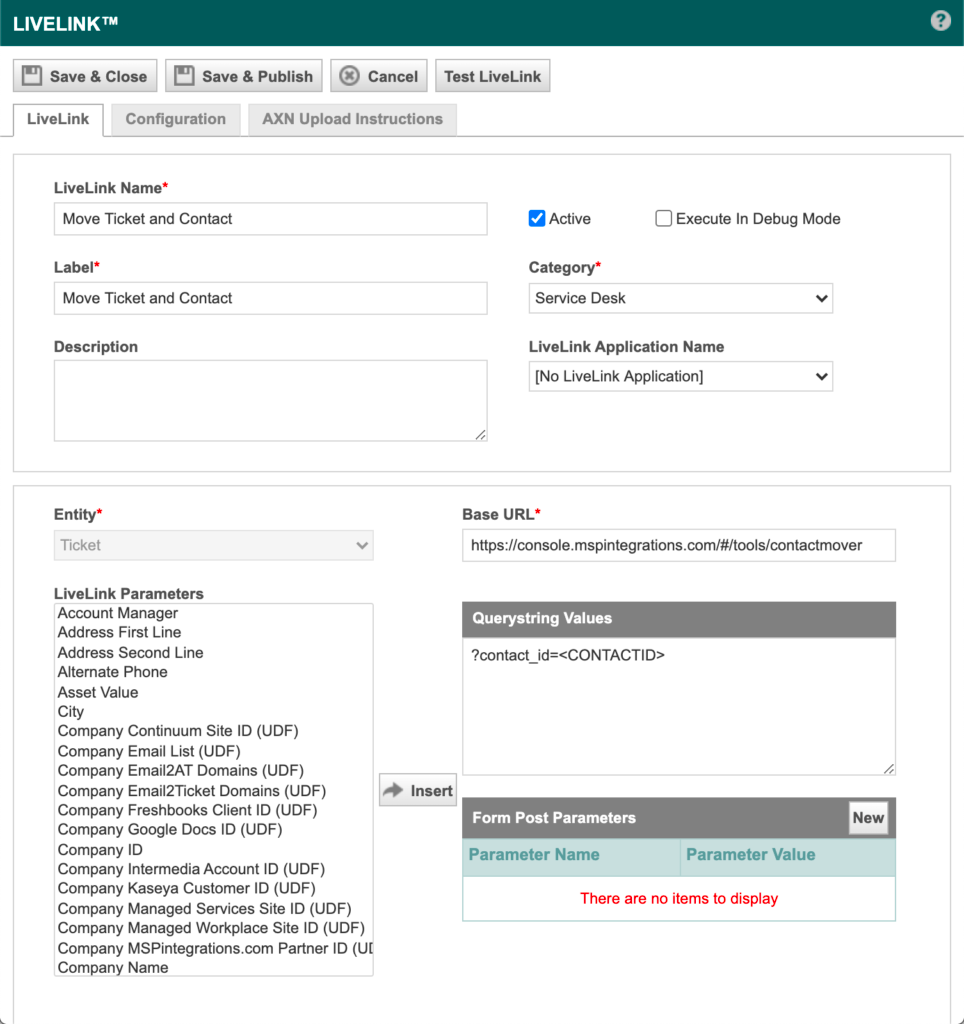
- From the main screen of the Autotask LiveLink Designer, click New to create a new LiveLink
- Complete the following fields:
- LiveLink Name: Move Contact and Ticket
- Label: Move Contact and Ticket
- Active: Checked
- Category: Service Desk
- LiveLink Application Name: Leave blank
- Entity: Ticket
- Base URL:
https://console.mspintegrations.com/#/tools/contactmover - Querystring Values:
?contact_id=
- At the top of the page, click Save & Close
Step 3. Publish the LiveLink
- From the main screen of the Autotask LiveLink Designer, right-click the Move Contact and Ticket LiveLink and click Publish LiveLink
- Click through the Security Levels, Departments, and Resources tabs to select the users who will have access to this LiveLink
- Click Overview to confirm which users will access to the LiveLink
- Click Save and Close